|
Examples:
1 |
2 |
3 |
4
Configuration example SearchForm
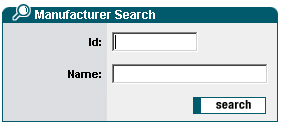
Configuration:
- Two text fields for search criteria.
- Image for replaceable button (Hover effect). The image for the inactive state is saved under the name btnXXX1.gif. The image for the Hover effect under the name btnXXX3.gif. The images are automatically exchanged on moving over the button with the mouse.
<forms:form
type="search"
caption="Manufacturer Search"
formid="frmSearch">
<forms:text
label="Id"
property="id"
size="11"
maxlength="10"/>
<forms:text
label="Name"
property="name"
size="25"
maxlength="80"/>
<forms:buttonsection>
<forms:button
name="btnSearch"
src="fw/scc/image/buttons/btnSearch1.gif"/>
</forms:buttonsection>
</forms:form>
|



 buy online
 ListControl