|
Examples:
1 |
2 |
3 |
4
Configuration example DisplayForm
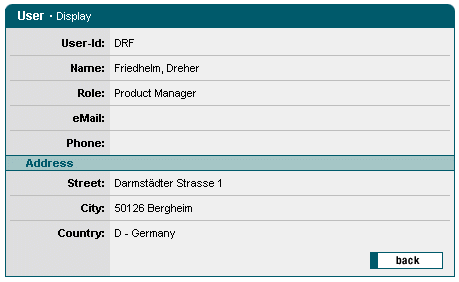
Configuration:
- Formatting the title and form width
- Inclusion of various output fields for the information to be displayed.
- Definition of a sub-section.
- Incorporation of a Back button, which results, in the action, in the invocation of a back_onClick()-method.
<forms:form
type="display"
caption="User - Display"
formid="frmDisplay"
width="450">
<forms:plaintext
label="User-Id"
property="userId"/>
<forms:plaintext
label="Name"
property="userName"/>
<forms:plaintext
label="Role"
property="role.value"/>
<forms:plaintext
label="eMail"
property="email"/>
<forms:plaintext
label="Phone"
property="phone"/>
<forms:section title="Address">
<forms:plaintext
label="Street"
property="fullStreet"/>
<forms:plaintext
label="City"
property="fullCity"/>
<forms:plaintext
label="Country"
property="fullCountry"/>
</forms:section>
<forms:buttonsection>
<forms:button
styleId="btnBack"
name="btnBack"
src="fw/cc/image/buttons/btnBack1.gif"
title="Back"/>
</forms:buttonsection>
</forms:form>
|



 buy online
 ListControl